Pages

Books We Are Reading In Class

Eastwood Public School

Windsor, Ontario, Canada

Global Read Aloud

We will be participating in the Global Read Aloud Project. We will be reading Marty Mcguire in the month of October and connecting with other classes about the book.

Primary Blogging Community

Each primary classroom will spend some time visiting the focus class' blog for a week, leave comments etc.

Class Wordle

We used Wordle to describe our classroom.

Thursday, April 25, 2013

Ways To Use Thinglink.com In Your Classroom


Thinglink can make your images come alive with music, video, text and images. All you have to do is upload a picture of your choice and start adding to your pictures to make them interactive.  I thought this was a great idea and wanted to find ways to incorporate it into my classroom and blog.  You can also share your pictures with people on Facebook, Twitter, Email, and can embed your finished images onto your blog.  The best part....it is super easy to use!
Here are a few ideas on how to use it in your classroom

1. Create an Interactive Image of Your Students' Work

For the first image, I took several pictures of my students and created one image on Photovisi.  I then uploaded the image to ThingLink and added my student's links of their non fiction books to their pictures.


 2.  Create A Thinglink About A Unit of Study or Use it as a Curriculum Launcher

Here is one you could use for Earth Day.


3.  Getting To Know You Activity

Have your students take a picture of themselves or have them draw themselves if you are going to put these on their blogs. (Yes you can use this website on the iPad).  Then have your students add text about themselves, likes and dislikes, a link to their favourite song, or book, etc.   I made one about myself  for an example:


There are so many other ways to incorporate this into your classroom. I would love to hear your ideas on Thinglink.

Sunday, April 21, 2013

Fun With Measurement

Our current math unit is measurement.  I know that most of my blog posts are about how I am integrating technology into my classroom, however, this is not one of those posts....There are times when you need to use manipulatives and tools that are not on the iPads.  Yes, there are apps for measuring on the iPads, but my students need to know how to properly compare lengths accurately and use a baseline when comparing the lengths of objects.  You can't learn that from using a computer or iPad, students need time to explore and use materials they choose to measure different objects.  I have a grade 1/2 class, the grade 1's expectations are to measure in non standard measurements and the grade 2 expectations are to measure to the nearest centimeter.  Both grades need to be able to estimate, compare and record lengths.  Therefor, the activities that I am going to share with you can be done in either grade.  My younger students are using different objects to measure and my older students are measuring and recording linear measurements using both non-standard and standard units.

How Big Is A Foot?

This was an introductory lesson to our unit.  I teach in a open concept school.  This means there are no walls or doors dividing my classroom to the classroom next door.  We put all 3 classes together for this lesson.  So when you see the pictures.....I don't really have 60 students in my classroom, there are 3 teachers also.
I began the lesson by reading the story, "How Big Is A Foot."  The King wants to give the Queen something special for her birthday. The Queen has everything, everything except a bed. The trouble is that no one in the Kingdom knows the answer to a very important question: How Big is a Bed? Because beds at the time had not yet been invented. The Queen's birthday is only a few days away. How can they figure out what size the bed should be?
We then chose 2 people from each class to trace their foot onto a piece of paper.  We ended up choosing the person in our class with the largest foot (the teacher) and the student in the class that had the smallest foot.  In the story the bed had to be 6 feet by 3 feet.  We made 18 copies of each foot and had the students cut the feet out.  We then made the beds and discussed why the beds were all different sizes and we answered why we thought the ruler was invented.

To extend this activity I made a math station for my students to do independently.

If you are interested in using this station you can download the instruction sheet here and the chart here.

Measurement Garden


 In art we made spring gardens.  Students were given a sheet of paper with different sizes of rectangles on it.  They were instructed to draw flowers in the boxes.  Then, students cut their flowers out, glued them on construction paper and either measured their flowers with cubes or a ruler and recorded their findings. 


Ordering Lengths With Toy Cars And A Ramp

The last measurement activity we did this past week started with this problem prompt:  How can you find out which of these three toys travels the farthest past the ramp?

Students were given 3 toy cars, a clipboard to turn over and use as a ramp, popsicle sticks for measuring the distance and a recording sheet.  Students chose partners and got to work.  Here are a few pictures of the activity:


If you would like the recording sheet to this activity you can get it here.

I hope you have as much fun as we did completing these measurement activities.


Sunday, April 14, 2013

How My Learning Environment Has Evolved


Over the course of the last 4 years I have transformed as an educator.  I previously was a kindergarten teacher, who taught routines and was fearful of change and what it meant to our routines. I then began teaching grade 1 and wanted to change the way I delivered my message more over I wanted learning to be enriched.

There have been 4 contributing factors to the change of the environment in my classroom.  My mindset, my students’ mindset, the social space and the physical space.

It is my goal as an educator to foster discovery and reflection through the dialogue and sharing of ideas. Our classroom learning space stems from this goal:  Our entire space was designed as a free and open area where learning is facilitated by student need.
The iPad cart is open for students to freely use to update their blogs and select the application that serves their learning need.  Our room is equipped with a projector, and an Apple TV so student creations can be shared with each other, with other classes and worldwide.

In order to have a positive social environment, I honor student voice and model positive interpersonal relationships.   I empower students by facilitating their learning through collaboration with each other and me.  Students in my class feel a sense of belonging in our classroom community.  This empowers them to take risks and explore new ideas.  My students have been taught to listen carefully to each other.

Students are given problems that are relevant and important to them.  Students often need to collaborate with outside experts through Skype or Google Hangout.   My students also use collaborative tools like wikis, and blogs.  By giving them the choice on what they learn about, they are intellectually engaged.  I center our learning goals on the big ideas and key concepts across the curriculum areas rather than limiting the students to one topic or curriculum expectation.  Learning is art, science, physical and virtual, local and global.
My students come to me as technology consumers.  My job is to teach them how to become content creators.  Many of my students have iPads or iPods at home already.  They expect learning to be fun.  My students come to me with curiosity and I embrace that curiosity through project based and inquiry based learning. 

I strive to inspire and develop the skills necessary for my students to succeed in the 21st century.  My students are encouraged to create, collaborate, communicate and motivate in my classroom.
If you step into my classroom you will quickly find out that we are a classroom with no walls.  Video conferencing, blogging, creating videos and books, teaching and learning from other peers in the classroom, in the school and in the world about what they are interested in is embedded into the daily instruction of my classroom.  The results of this purposeful connectivity is that my group of grade1/2 students have begun to develop a global perspective of issues that could not have been authentically discovered if they were solely engaged in books in our classroom.
I have not done this alone.   I have a personal learning network of many like-minded educators who I have sustained learning relationships with.  My students embrace change and I embrace change. As my teaching methods and the technologies I use continue to evolve, the transformation of my learning environment will continue as a journey, not a destination.


Read Alouds - From Boring to Brilliant

Who remembers when they were young, listening to their teacher (well not really listening) do a read aloud to them?  I'm not talking about a short picture book, I am talking about a chapter book....I remember sitting there, day after day, while my teacher sat at her desk, and me at my desk, and her reading to us, while we sat completely still, thinking about anything else besides the book she was reading.  To be honest, I can't even remember a single title of any read aloud my teacher read that particular year....

I really think my teacher just thought if we did anything besides sit there and be still we wouldn't be able to pay attention to the story.  But in fact the opposite was true.

Now I'm not saying that every child in my classroom is 100% engaged while I am doing a read aloud.... However, I know it is a very high percentage of them.  I know this because they are showing their thinking while I am reading to them.

I have worked very hard this year on modeling explicitly how to show their thinking while reading.  Not just with read alouds, but with independent, shared, and partner reading.  From this modeling, I am confident that my students are thinking critically while they participate in our read alouds.

Here are a few ways we spice up our read alouds in my classroom:

Using TodaysMeet.com


I have an anchor chart on my board with ways that students can show their thinking:
they can make connections, ask questions, visualize, write down vocabulary they are unsure about, write about their feelings, write a summary, etc.  I remind them about all these ways, then I let them go at it while I read.  I use todaysmeet instead of sticky notes, a notepad, or an iPad a lot lately because it gives them a little push to write.  I like todaysmeet because students can see who is writing the comments, other students can read and comment on other students' comments and it is a closed environment.  All I do is set up a room, hand out QR codes that take them to the correct URL and they show their thinking while I am reading.

Draw or Sketch While You Read

My students love to close their eyes and visualize the pictures in their heads, they often sketch in their notebooks or on the iPad what they are visualizing.  Here is an example from a student who drew a picture on her iPad, then uploaded it to her blog.

Use Twitter

We have a classroom Twitter account, so students can tweet out things that we are doing, or respond to what other classes are up to.  One of my students tweeted about reading the book Clementine last week and we had responses from many other classes that are also reading it.  

Use Skype or Google Hangout to Connect To Other Classes 

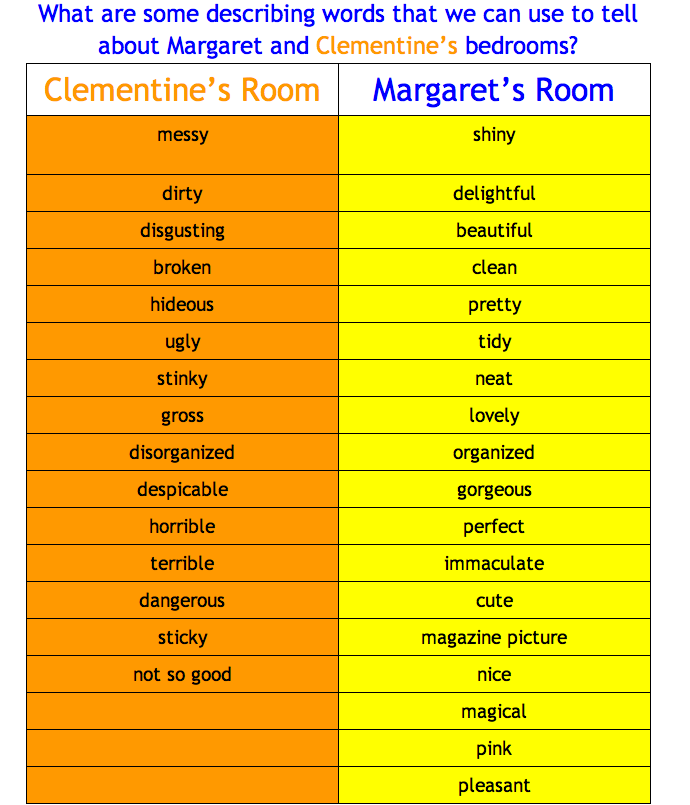
We are currently reading the book Clementine.  There are 18 other classes reading it at the same time.  We put a tweet out on twitter to see if any other classes were interested in reading a chapter with us.  Last Wednesday we read chapter 2 with another grade 2 class.  This led to a google doc being shared with us comparing the two main characters bedrooms.  Both classes added to the google doc below.


Participate in A Global Read Aloud

Reading the same book at the same time with several other classes is exciting.  Not just for the students, but for the educators too!  You can collaborate on projects, share resources, and have so many more options to extend the text.  My students are currently on Edmodo discussing the book Clementine with 2 other classes.  They not only have their classmates to discuss the book with, but they have other students from around the globe to collaborate with!  Here is the link for The Global Read Aloud 2013 . They are currently voting on which books we will be using.  You can also check on Twitter.  I was lucky enough to see a tweet from Louise Morgan - the #2ndchat moderator (@MrsMorgansClass) announcing they were going to do a global read aloud on the book Clementine, and I signed up!

Create A Class Project To Accompany The Book

I had Jenni Van Rees (@jennivanrees) contact me about us "hosting" one of her Flat Stanleys' for a month.  I of course accepted.  Jenni created a blog for the Stanleys' going out and gave us directions on how to get on the blog to document our adventures.  Since I knew we would be receiving Stanley, I started reading the first Flat Stanley Book.  My students loved the book!  What they loved more though, was thinking of adventures and taking pictures of Flat Stanley at our school.  I even had a child bring in the second book for me to read to the class for our next read aloud. 


Having a Different Person Read A Chapter

Tomorrow, we will be Skyping with Mr. Deluca's (@MrJDeLuca) grade 2 class.  Mr. Deluca will be reading chapter 4 of Clementine to us.  My students love to hear how other people read to them.  Will Mr. Deluca make different character voices?  Will he share some of his connections and thinking with us?  It will be a surprise!

What are some of the exciting things you do to engage your students while you read to them?


Tuesday, April 2, 2013

Using the iDiary for Kids App As A Thinking Book

My classroom, for the most part is paperless.  My students do not have notebooks, or binders, or folders that contain copious amounts of paper that will end up in the recycle bin as soon as they are able to bring it home.  My students sit at desks, however, they rarely use the inside of them.  My students all have a book box that contains the books they are currently reading and a writer's workshop folder that contains a few pieces of writing they are currently working on.  For the most part, students' work is stored on our iPads using Dropbox, Kidblogs and Youtube.

I wanted to offer my students a way to share their thoughts, feelings, questions, and  problems.  I also wanted to encourage my students to express their thoughts about what is going on in the classroom and at home.  I wanted them to have an option to keep their work private from their classmates.  I wanted them to learn that not everything they wrote or produced was intended for an audience.  

Notebooks were a great idea, however, we have 20 iPads and going to my administration to ask for money for notebooks was not something I wanted to ask for.  I searched the app store and asked my PLN for any suggestions for "diary type apps."  I bought a couple to try and was pleasantly surprised with the iDiary for Kids app.

This app allows students to write personal entries, upload photos and draw pictures.  The journals are password protected and you can have multiple users on the same app.  When you first open the app students fill in their name, password, email(we did not add an email) and Title of their book.  They get to choose their cover color, picture and text color. 


Once students have filled out the preferences page and saved it, they can enter the app,  and choose the book they want to work in (if you have more than one student using the iPad or the student has more than 1 book you can have multiple books on this page).


The student chooses their book and enters their password.  The book opens to the current date and the student has the option to write, draw, or upload a photo to their book.


A great addition to this app is when the student starts to type, the book automatically enters a time stamp to the page in the column.


How did I introduce this book to my students, you ask?  I read this fantastic blog post by Rolan Lee, where he explain how he incorporates thinking books into his program and he posted this picture:

Source: http://spicylearning.wordpress.com


I took his idea and started modeling to my students different ways to use their thinking books.  Their thinking books have now become their everything books!  They doodle, they pose questions and answers,  they sketch what they visualize while I'm reading to them, and they use it as a journal and take pictures of their work.  Some of my students have been taking screenshots of things they want to share with others and posting them onto their blogs.  They love that they now have the option to share or to keep it to themselves as they work through their thinking process.  One of my grade 1 students said to me today, "Mrs. Wideen, our thinking books are like our blogs, but we can choose our audience for our thinking books.  It could be a friend,  the teacher, the world if we post it on our blog or just ourselves.  I like that we have the choice."  


Monday, April 1, 2013

Using TodaysMeet During Literacy


This past week, we welcomed the Early Years Teachers, Our Vice Principal, and our grade 1 teacher in to see how we incorporate our iPads and technology into our classroom.  We showed our guests how we use a website called TodaysMeet.  This website encourages the room to use a live stream to make comments and ask questions (Sort of like Twitter, but it is private).  I have used this in professional PD before and I knew that my students would love to try it.  I created a room (gave it a name and chose to keep the room open for 1 month) and then created a QR code with the web address so my students could quickly scan it using their iPads and it would take them to the site.  We have been working on making meaningful connections the past few days in class so I asked the students to make text to self connections while I read the story Koala Lou.  

Our guests were amazed at the engagement of this lesson.  My students typed feverishly while I read Koala Lou.  I stopped periodically through the story to make my own connections and to give my students time to add their connections.  You could hear a pin drop in my room during this activity.  When we concluded the activity, I told them we would come back to their connections the following day to figure out which kinds of connections help us the most.  My students couldn't wait to follow up the next day.


I have also used TodaysMeet to encourage predictions, ask questions and inferring.  While I read our current read aloud (Flat Stanley) students were encouraged to read the other responses on todays meet and to take the conversations of the book deeper.  Children began to collaborate to infer answers, solve problems and construct meaning.  


I love to hear, my students ask, "Can we use TodaysMeet today while you read to us?"  Have you ever used TodaysMeet?  I would love to hear how you are incorporating it into your classroom.

Sunday, March 31, 2013

From 1 iPad to 20 iPads and How It Has Changed My Classroom

I was challenged to improve my students’ vocabulary and sight word recognition with one iPad in the Fall of 2011. My students were amazingly successful and we only used 4 skill building apps. This minor success developed into a written proposal for 20 more iPads, a MacBook and an iPad cart. Our proposal was fulfilled and we received all of the technology in May of 2012. Skill building has developed into knowledge building through the use of applications on the iPad that harness the power of creation, communication, collaboration and motivation.

 My multidisciplinary approach in the use of the iPads has led to the demonstration of student growth in Literacy, in Math, and in Digital Literacy. The use of applications such as Show Me, Draw and Tell, iMovie, and Explain Everything has been our content creator. Student directed blogging, Youtube and Twitter have been our marketing campaign where we have celebrated our learning globally.

 I am very excited about the results I have seen and the knowledge I have gained. Out of 21 students, I have 10 students at least one year above their reading level for their age, 7 students reading at grade level and 4 who are well on their way.

Students in my class are excited to write because they now have the excitement of an authentic audience. My students’ favorite question is, “Can we embed this onto our blogs when we are finished?” Yes! My grade one students actually say “embed!” We are continually looking for different apps to use to publish their writing. We have used Scribblepress, Book Creator, Book Buddy, Explain Everthing, iMovie, LittleBirdTales, PuppetPals, Kidblog and Toontastic to publish their writing. Can you imagine having these choices as a student? At the beginning of the year, I had many reluctant writers, now, my students are excited to write and always ask for more time to complete their writing.

 Incorporating the iPads into their math stations have provided them with an important visualization and manipulation tool that relieves anxiety and improves engagement. Students are showing their learning by answering math problems using content creation apps. These apps record problem-solving solutions, and are shared with peers for analysis and growth. My students benefit from learning from peers more than when I am instructing. During my math lessons, students are actively using the apps and displaying their math strategies using the Apple TV. This also helps me give instant feedback to my students. I act as a facilitator and their leader.

 Aside from the benefits my students have gained, I have been granted additional benefits for myself as an educator. I have found applications for the iPad (Evernote, Audio Boo) that have been able to augment my assessment and evaluation of students at an entirely new level. Now included in my anecdotal notes are photographs of student work, audio recording of students reading and video of student presentations. These tools enable my students to pause, rewind and replay their learning in order to identify errors and comment on their work, and for me to be able to give them authentic feedback. Much of what is documented is shared via students’ blogs and parents then participate in the celebration of learning successes.

 What started as the success of making a one iPad classroom work has turned my classroom to a knowledge building environment where my 6 and 7 year olds are in charge of their own learning.